
Canary Release Strategy
Overview
Canary deployment in Facets is an Argo Rollouts-based deployment strategy that incrementally rolls out changes to a subset of your infrastructure before promoting to the full environment. It reduces risk by validating changes in a limited scope before full production exposure.
Supported Resource Type: service
Prerequisites
- A service resource configured in your Facets blueprint.
- A Kubernetes cluster with Argo Rollouts (included with Facets).
Required permissions:
- Plan Release / Apply Release Plan — to trigger releases.
- Promote — to graduate canary to stable, abort — to halt a canary rollout.
Step 1 — Configure Canary Strategy on the Service Resource
In your service resource configuration JSON, set the deployment strategy to Canary and define rollout behavior:
{
  "spec": {
    "release": {
      "strategy": {
        "type": "Canary",
        "canary_strategy": {
          "enable_auto_abort": true,
          "auto_abort_timeout": 120
        }
      },
      "deployment": {
        "max_surge": 1,
        "max_unavailable": 0,
        "min_ready_seconds": 30,
        "progress_deadline_seconds": 600,
        "auto_promotion_seconds": 300,
        "scale_down_delay_seconds": 30
      }
    }
  }
}
Key Configuration Options
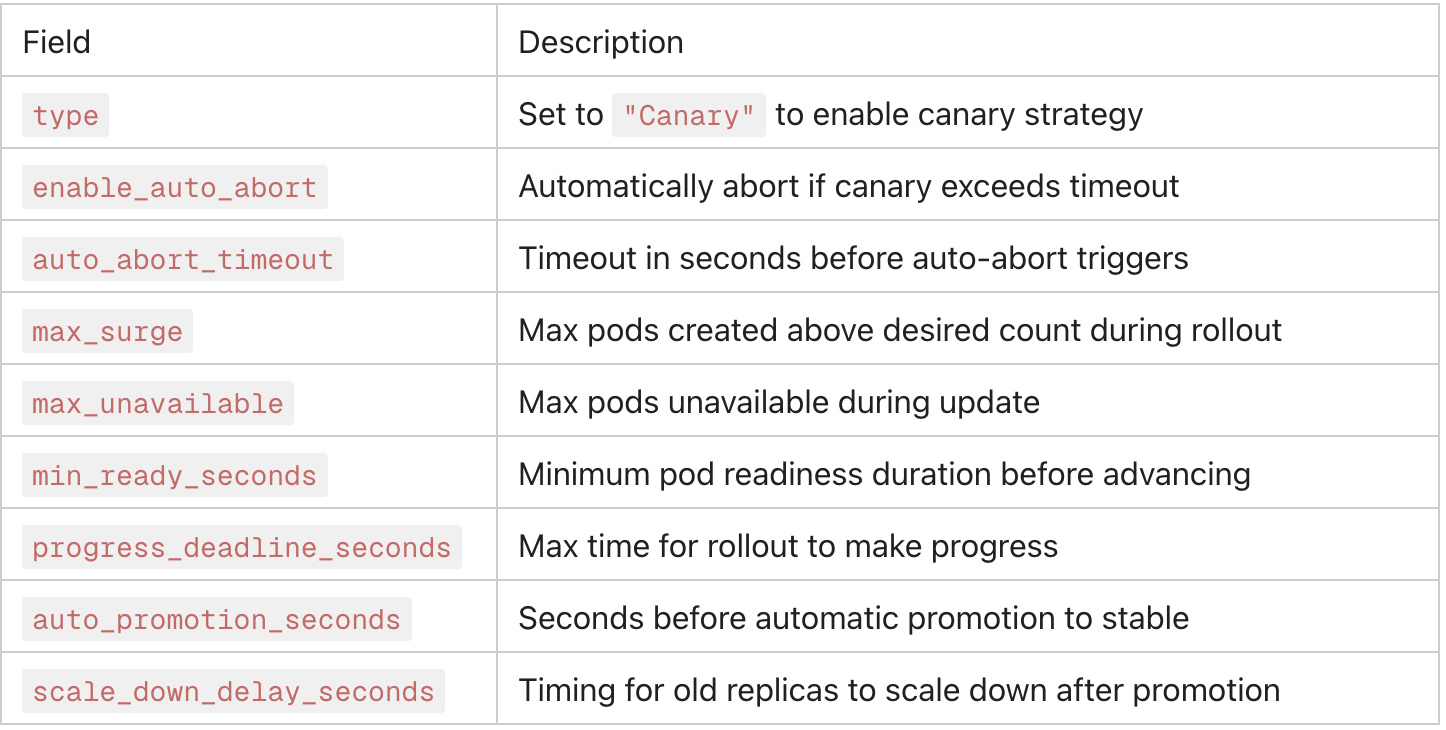
Step 2 — Trigger a Release
- Navigate to your Project → Environment in the Facets UI. Go to Releases and click Trigger Release.
- Select the service resource(s) with canary strategy configured.
- Click Plan to preview the release changes (dry-run).
- Review the plan output and click Apply to begin the canary rollout.
- Facets will initiate the Argo Rollouts controller, which creates the canary pod set alongside the stable set.
Step 3 — Monitor the Canary Rollout
During an active canary rollout, monitor progress via:
- Live Insights & Operations dashboard — real-time pod-level metrics (CPU, memory, restart count).
- Kubernetes Dashboard — pod status, events, and deployment progression.
- Kubernetes Events Dashboard — filter events by namespace to track rollout activity.
Watch for:
- Pod restart frequency or CrashLoops in canary pods.
- Elevated error rates or latency from canary traffic.
- progress_deadline_seconds breaches indicating a stuck rollout.
Step 4 — Promote or Abort
Promote (Graduate Canary to Stable)
If the canary is healthy and validated:
- In the Facets UI, navigate to the resource's Live Tab. Click the Promote action.
- This advances the canary version to stable and scales down the old stable pods.
Automatic promotion: If auto_promotion_seconds is set and the canary remains healthy, Facets promotes automatically after the configured duration without manual intervention.
Abort (Rollback Canary)
If issues are detected:
- Click the Abort action in the UI.
- Argo Rollouts immediately stops the canary rollout and scales the canary pods down, restoring full traffic to the stable version.
Automatic abort: If enable_auto_abort: true and the rollout exceeds auto_abort_timeout seconds, Facets aborts automatically, preventing prolonged exposure to a faulty update.
Canary Metadata (Optional)
You can apply distinct labels and annotations to stable vs. canary pod sets for observability and traffic filtering:
{
  "stable_metadata": {
    "labels": { "track": "stable" },
    "annotations": {}
  },
  "canary_metadata": {
    "labels": { "track": "canary" },
    "annotations": {}
  }
}
This is useful for routing canary traffic through a separate ingress path or for filtering metrics by deployment track in your monitoring stack.
Updated 3 months ago