
Web Component Builder
What it is
The Web Component Builder is an AI-driven capability within Praxis that lets users create, deploy, and embed custom web components into the Facets dashboard — entirely through conversation. No manual scaffolding, no DevOps overhead. Describe what you need; Praxis builds, deploys, and integrates it.
How It Works
The capability operates as a structured three-phase pipeline:
- BUILD: Praxis scaffolds a web component application integrated with Facets APIs, based on a plain-language description. Supports Lit, Stencil, or vanilla Web Components.
- DEPLOY: Praxis commits the generated code to GitHub, configures GitHub Pages, and publishes the component to a stable URL.
- INTEGRATE: The live component URL is embedded directly into the Facets dashboard as a sidebar app (NAV_APP) or tab (TAB_APP).
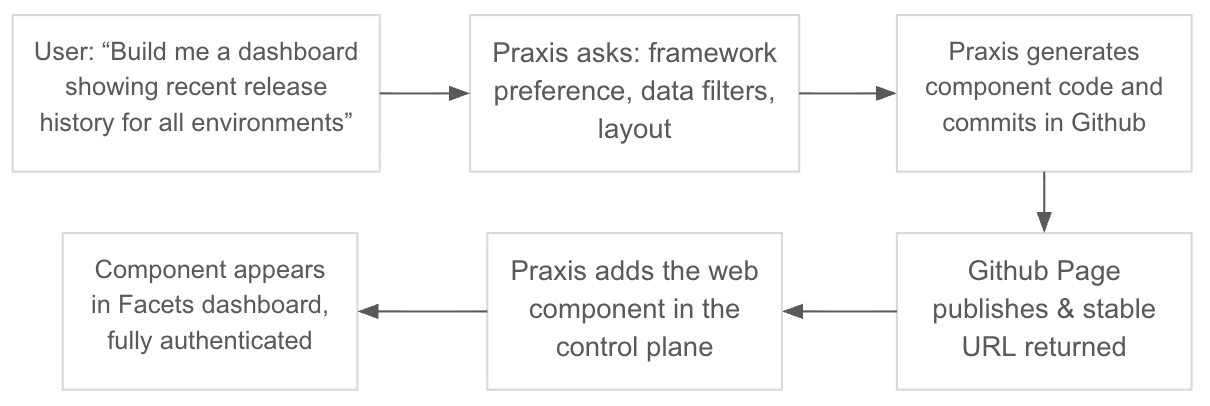
Technical Integration
| Mechanism | Detail |
|---|---|
| Authentication | Components inherit the active browser session via session cookie — no API keys or auth headers required |
| API access | Components use relative paths (e.g., /cc-ui/v1/audit-logs) to call Facets APIs |
| User context | Platform passes user information as JSON-encoded attributes for personalized interactions |
| Registration | Via Organization Settings → Web Components → Add Component |
Key Advantages
-
Zero manual coding required: Users describe desired functionality in plain language. Praxis handles scaffolding, API wiring, GitHub configuration, and deployment automatically.
-
End-to-end automation: A single conversation takes a component from idea to a live, embedded dashboard widget — no context-switching between tools.
-
Stable deployment URLs GitHub Pages URLs persist across updates. Re-describing a change causes Praxis to update and redeploy; the Facets integration reflects the update automatically with no reconfiguration.
-
Rapid iteration Changing a component is as simple as describing the change. No build pipelines to manage, no redeployment steps to coordinate manually.
Example Use Cases
- Release Quality Dashboard (https://github.com/Facets-cloud/release-qual-dash) (to gauge the quality of releases going in any environment)
- Custom resource dashboards (cost breakdowns, deployment history views)
- Environment health summary widgets embedded in the sidebar
- Audit log viewers and compliance trackers .... and many more....
Updated 3 months ago